STEP 9
To set the grids and navigators out, go up to Data Controls Tab and click on
it. Click on the grid button  . Place it on
the background. Click on the navigator button . Place it on
the background. Click on the navigator button  , and place it right below the grid. Now do this
two more times for a total of three (3) grids and three (3) navigators. Now you
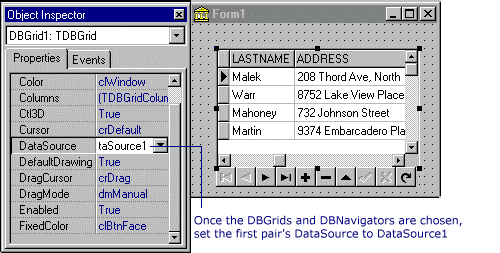
must choose one grid and then one navigator at a time and set its DataSource, as
shown in this and following examaples. , and place it right below the grid. Now do this
two more times for a total of three (3) grids and three (3) navigators. Now you
must choose one grid and then one navigator at a time and set its DataSource, as
shown in this and following examaples.
|